
Last updated October 27, 2026
This page shows the opt-in of Tailgate Office's texts to its own subscribers as it appears on our public sign-up form and on a subscriber's Account page, and the texts that follow it, word for word. The box here is a copy and sends nothing.
These texts go only to Tailgate Office’s own subscribers, the contractors who use Tailgate Office, about their own accounts, at the one mobile number each gave us with a ticked box and confirmed with a code. Tailgate Office, LLC sends them. They never go to anyone’s customers.
1. Our public sign-up form
Anyone starting a free trial opens our sign-up form, https://www.tailgateoffice.com/get-started/, a public page that needs no account or login. Under the name and the email is an optional field, “Mobile number for text alerts (optional)”, and under it an unticked box, never required to start the trial, with the no-sharing sentences and the SMS Terms and SMS Privacy Policy links. A number is kept only with the box ticked.
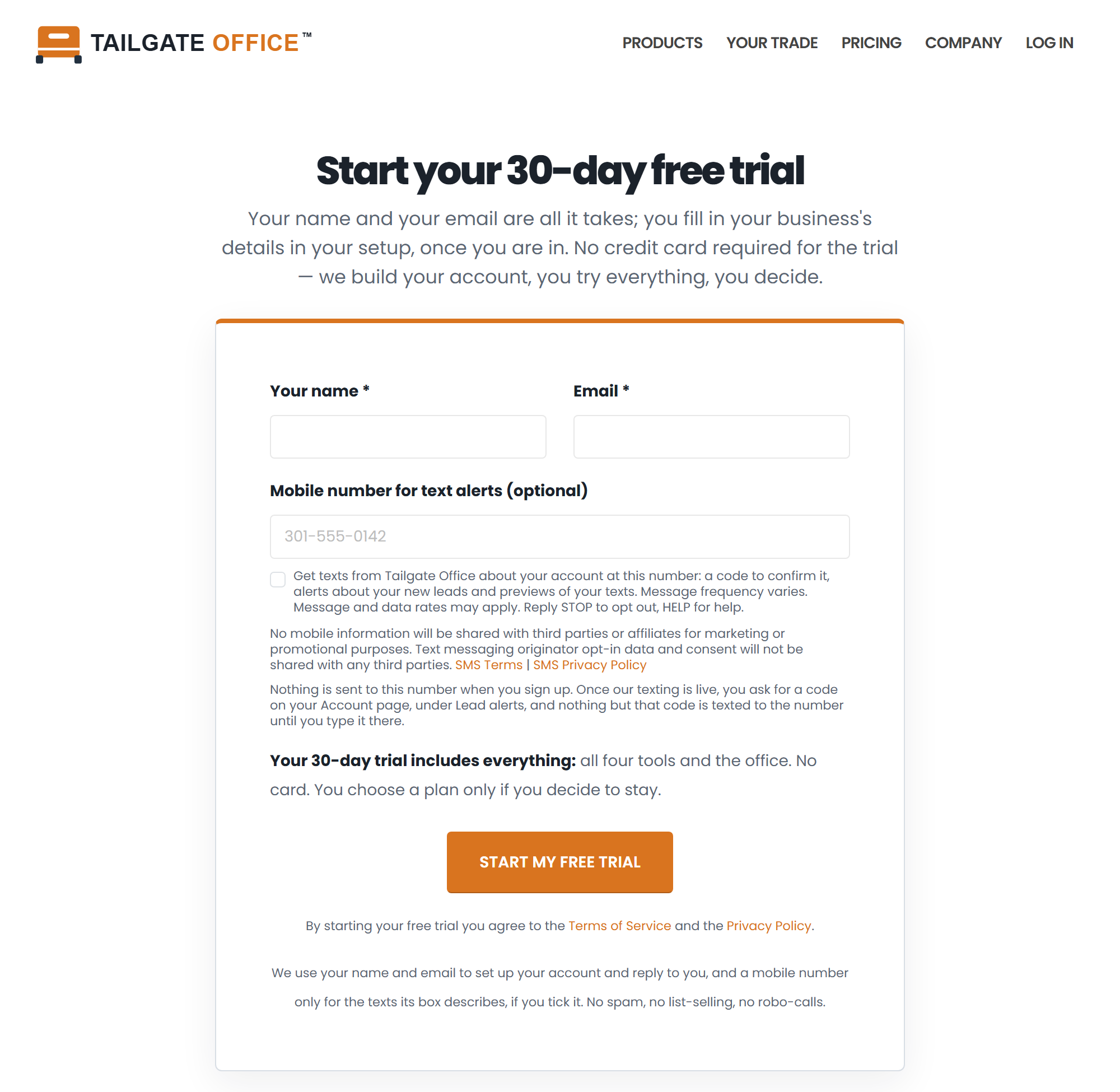
2. The box, word for word
The same box, with the same words and links, is on the sign-up form and on the Account page. This copy cannot be ticked:
A copy of the box on the sign-up form and the Account page. The real one is on https://www.tailgateoffice.com/get-started/.
No mobile information will be shared with third parties or affiliates for marketing or promotional purposes. Text messaging originator opt-in data and consent will not be shared with any third parties. SMS Terms | SMS Privacy Policy
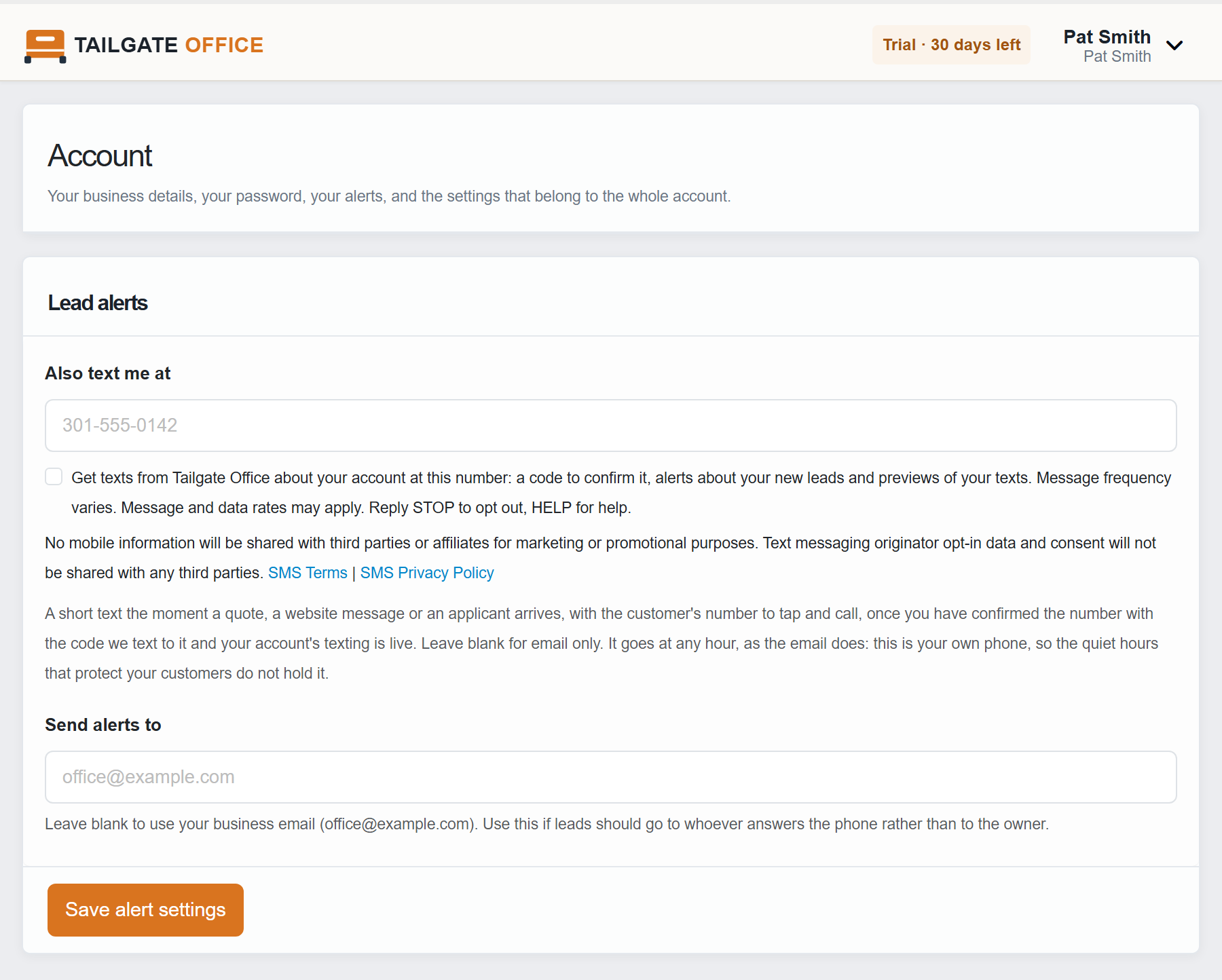
3. The Account page
A subscriber who already has an account can add or change the number at any time on their Account page (https://www.tailgateoffice.com/members/account/, after signing in), card “Lead alerts”, under “Also text me at”, with the same box and links.
4. The texts that follow, word for word
Nothing but the code is ever sent to a number before it is confirmed. The code goes as soon as the Account page’s card is saved; for a number given on the sign-up form, once the subscriber has signed in and pressed “Text me a code” on the Lead alerts card. They type the code on that card.
The code:
Tailgate Office: your code is 482913. It expires in 10 minutes. Reply STOP to stop texts from us.
Once the code is right:
Tailgate Office: you will get account and preview texts at this number. Msg frequency varies. Msg & data rates may apply. Reply STOP to end, HELP for help.
An alert about a new lead (the square brackets stand for the real number in the real text):
Tailgate Office alert: New quote request: Pat Smith, 21044. Call [customer's number]. https://www.tailgateoffice.com/members/inbox/?thread=1042
A preview of a text the subscriber’s account composed, sent to the subscriber alone:
Tailgate Office preview, sent only to you, of the text CallMitt would send a caller: "Thanks for calling Joe's Roofing! We're closed right now, but we got your missed call. Reply to this text and we'll get back to you first thing. Reply STOP to opt out." Reply STOP to end previews.
The path, in short
- A contractor types their own mobile number on our public sign-up form or, signed in, on their Account page, card “Lead alerts”.
- Under it is the unticked box above, with the no-sharing sentences and links to the SMS Terms and the SMS Privacy Policy. It is never required, and a number is kept only with the tick.
- We text that number a code, and nothing else until the code is typed on the Lead alerts card. Once it is right, the number gets the confirmation above, then alerts about the contractor’s own new leads and previews of texts their account composed.
Message frequency varies with the contractor’s own leads. Message and data rates may apply. Reply STOP to opt out, HELP for help, or email support@tailgateoffice.com. No mobile information will be shared with third parties or affiliates for marketing or promotional purposes. Text messaging originator opt-in data and consent will not be shared with any third parties. Privacy policy: https://www.tailgateoffice.com/sms/privacy/. Terms: https://www.tailgateoffice.com/sms/terms/.
Step by step, with every reply: https://www.tailgateoffice.com/sms/terms/#subscriber-path.