
The paperwork, without the paperwork
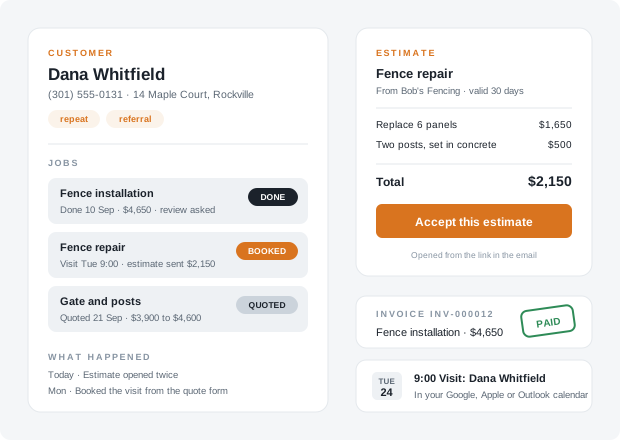
A quote comes in through NapkinPrice. That is a customer now, with a job on her record, in the status quoted. She books a visit from the quote form, once visits are switched on for your account: booked. You type the estimate on your phone in the truck and press Send; she opens the link and taps Accept, and the job says accepted with the agreed price on it. When the work is done, one press marks it done and, once HurraBell is on, asks her for a review; the invoice is one more click on the accepted estimate.
Every one of those steps is on her record, in order, with the time. Next spring, if you asked for it, she gets a reminder that it is time to do it again.
From a quote to a paid invoice
Four steps. The first and the third happen without you touching anything.
A quote opens a job
The lead from your website becomes a customer record with a job on it, at the range the widget quoted. A visit booked from the quote form moves it to booked.
You send the estimate
Lines, quantities, tax if you charge it, a note, how long it holds. One button emails the customer a link with your address as the reply-to.
They accept from the link
The customer types their name and taps Accept. The job moves to accepted with the price on it, and you get an email. Opens are counted while it can still be accepted.
Done, reviewed, invoiced
Mark the job done from the customer's page, or by marking its visit done. Once HurraBell is on it asks for the review, and the invoice is one click from the accepted estimate.
What is in the office
Nine things, each one built for a one-truck business run from a phone.
Customers
One record per person: phone, email, address, notes, tags, and everything that happened, in order. Add one by hand, import a CSV from wherever your list lives today, merge two records for the same person, export the lot. Applicants are never customers.
Jobs and the Work page
Every job moves from quoted to booked, accepted and done, with the quote's range and the price you agreed. The Work page is the crew's list: every open job, who it is assigned to, the next step and the day it is due.
Estimates
Start from a job on the customer's page, or blank. Lines, quantities, an optional tax rate, a note, how long it holds. Sent by email with a link; the customer accepts by typing their name. Accepting is not a signed contract, and the page says so.
Invoices and Pay online
One click from an accepted estimate, numbered, with a due date. Sent by email; marked paid or voided by hand. Save your own Stripe restricted key and the customer sees a Pay online button: the money lands in your Stripe balance and the fee is Stripe's.
Repeat-service reminders and the referral ask
Set a job to come back in three, six, twelve or twenty-four months, counted from the day it was done if you set it then, or from the day you set it, and the customer gets an email in your words when it is time. After a finished job, one ask for a referral. Both go out through the same homeowner-email path as review requests.
Your reviews on your quote form
Type your Google rating and paste a few reviews on the HurraBell page; the quote widget shows them above the form on your own website. Your words, on your site; nothing is fetched from Google.
Your visits in your calendar
One secret link that Google Calendar, Apple Calendar or Outlook subscribe to: booked visits for the next 90 days and the crew's next steps with a due day. Read-only, refreshed by the calendar app itself.
Postcards
A headline and a message, the addresses of every customer with a mailing address on record, or only those with a tag you name, or a list you paste, as a print sheet for postcard stock and as a CSV for a print shop. You print and mail them; nothing is sent for you.
Suggested replies, and translation
In the inbox, one button drafts a reply from the conversation and your own facts: your services, hours and phone. It runs under your own Anthropic key: that conversation goes to Anthropic under your key, Anthropic bills you for the draft, and it is never a line on our bill. A message in Spanish shows "Translate from Spanish" in Chrome, on your own machine.
What works today, and what waits on you
Written out so you are not surprised on day one.
Working today
Customers, jobs and the Work page. Estimates sent by email and accepted from the link. Invoices sent by email, marked paid by hand. Your reviews on your quote form. The calendar feed. Postcards. Translation in the inbox in Chrome 138 or later.
Working once you paste a key
Pay online needs a restricted key from your own Stripe account, saved on your Account page; card payments then run on Stripe's page under your name. Suggested replies need your own Anthropic API key, saved the same way, and Anthropic bills that key per draft. Both are built and waiting for a real key to prove them; neither is a line on our bill.
Working once homeowner email is on
Repeat-service reminders and the referral ask go to your customers by email through the same path as review requests. They start once we switch on homeowner email (off for everyone today), you turn them on under Customers > Reminders, and your mailing address is saved; a customer with no email on their record is not written to. Visits booked from the quote form, and the booked step, start with the same switch. Until then nothing is sent and nothing is lost.
It is a customer list, not a CRM of record
No pipeline stages, no deal probabilities, no job costing, no dispatch board. If you run Jobber or Housecall Pro, keep them: a CSV export, or the signed webhook through Zapier (live in beta), hands every lead across, and the estimate and the invoice here are for the one-truck shop that has nowhere else to send them. The how-it-works page lists what we deliberately do not build.
One plan, everything
The office comes with the Tailgate Office Bundle, because every piece of it reaches across the four tools: a job starts from a quote, is booked from a visit, asks for its review when it is done and, once its invoice is paid, shows up in your Monday summary as money in. A single tool keeps its own basics. Every free trial has all of it for 30 days.
The Tailgate Office Bundle
Only need one of the tools? After the trial you can keep just that one at its own price; the office stays with the Bundle.
Want to see the quote form first? Try it on an example contractor site. The trial has all of the office on day one, and nothing is charged until you pick a plan at the end.
The office your truck never had.
Set it up tonight. It quotes tomorrow's leads, and every missed call you log gets answered from one inbox. Free for 30 days, no card required.