
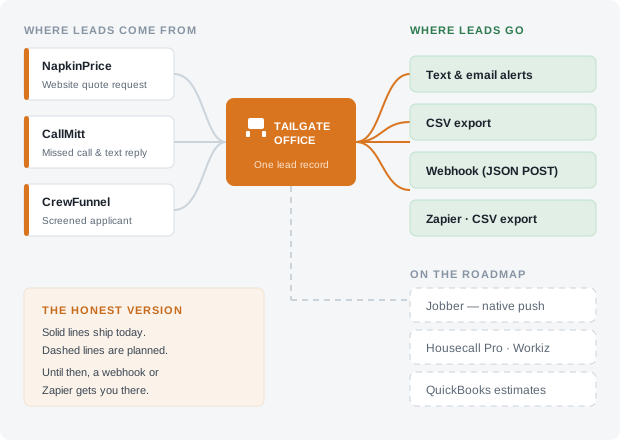
Diagram drawn before the text and Google Sheets routes moved to the roadmap. The live routes today are the shared inbox, the email alert to your office, signed webhooks, Zapier and CSV export — the table below is the authoritative list.
We would rather be plumbing than a destination
Tailgate Office catches leads at the front — the website visitor who wanted a price, the caller who rang out, the guy who texted CREW. What happens next is your business, in your software. Our job is to hand the lead over in one piece, fast, with the whole job spec attached.
There is a version of this page every SaaS company writes, with a wall of logos and no indication which ones are real. This is not that page. Everything below is sorted into live today or on the roadmap, and roadmap means we have not shipped it. If you need a route that is still on the roadmap, a webhook or Zapier gets you there this week.
Five routes that work the day you sign up
Turn on as many as you like. Most contractors run the inbox plus one other.
Everything lands in the shared inbox
Quotes, missed calls and applicants arrive in one thread list the whole office can see, with assign, snooze and mark-as-won — and anything from the same phone number stitches into the same thread. Works fine on a phone in a truck.
Outbound webhook (JSON POST)
Signed with HMAC-SHA256, retried with backoff, with a delivery log you can inspect. This is the one your agency or developer wants.
Zapier and Make, via webhooks
Use their generic "catch a webhook" trigger and you are connected to a few thousand apps today. A listed app in the Zapier directory is on the roadmap — see below.
CSV export, any date range
All leads, all answers, all scores. No "contact support to request an export," no gated data. It is yours, and it keeps working after you cancel.
Calendar invites for interviews
Book an applicant into a slot and a standard .ics invite downloads from their page — drop it into Google Calendar or Outlook, or forward it on. Sending it to the applicant for you is still not built — the mail relay is live now, but nothing composes an applicant-facing invite email yet.
An email alert to your office is now a route you can rely on — a new quote or a finished hiring screening emails whoever you nominate, with the full job on it, and you can turn it off or point it somewhere else from your account page. Two routes people expect are still not in this grid: a text alert to your phone and call forwarding from your carrier. Both are on the roadmap, both are in the table below with the reason written next to them, and neither is a route you can rely on this month.
The whole list, with the status written on it
If a row says On the roadmap, it does not work yet. We are not going to print a logo and let you assume.
| Where you want the lead | Status | How it works right now |
|---|---|---|
| Shared inbox in the dashboard | live | Every quote, missed call and applicant, in one thread list the whole office can open. |
| Webhook / your own software | live (beta) | Signed JSON POST with retries and a delivery log. Deliveries wait for the worker, which is being scheduled; the log shows each one. |
| Zapier & Make | live, via webhook | Use the generic webhook trigger today. A listed Zapier app is on the roadmap. |
| CSV export | live | Any date range, all fields, from the dashboard. Still works after you cancel. |
| Calendar (.ics invites) | live | Booking an interview produces a standard .ics you download and forward. Sending it to the applicant is on the roadmap. |
| Text message to your phone | On the roadmap | Messages are written and held in your outbox today, with the block reason on screen if a compliance rule stopped one. Delivery turns on per account once carrier registration clears. |
| Email alert to your office | live, one recipient | A new quote or a finished hiring screening emails whoever you nominate, with the full job on it, and you can turn it off or point it somewhere else from your account page. Several recipients and per-recipient value thresholds are still on the roadmap; the Monday weekly summary email already goes to the same address. |
| Call forwarding / carrier hook-up | On the roadmap | Today a missed call is logged from the dashboard and the text-back runs off that. The automatic route is on the roadmap: you dial a forwarding code once, a call you do not answer forwards to your own texting number, and the text-back goes out from there. Your business line stays exactly where it is. |
| Google Sheets | On the roadmap | Today: CSV export you drop straight into a sheet. A direct, auto-appending Google Sheets connection needs Google sign-in and is on the roadmap. |
| Jobber | On the roadmap | Today: webhook or Zapier into Jobber, or the CSV export. Native push is on the roadmap. |
| Housecall Pro | On the roadmap | Today: webhook or Zapier. Native push is on the roadmap. |
| Workiz | On the roadmap | Today: webhook or Zapier. Native push is on the roadmap. |
| QuickBooks Online | On the roadmap | Today: estimates and invoices live in the Bundle, with a CSV export your bookkeeper works from. Pushing them into QuickBooks is on the roadmap. |
| Zapier directory listing | On the roadmap | Works via webhook today; a searchable app in their directory is on the roadmap. |
| Two-way calendar sync | On the roadmap | A downloadable .ics per booking today. Reading your live availability back is on the roadmap. |
| Facebook lead ads | On the roadmap | Not built. Say so and we will weigh it — this list is ranked by what customers ask for. |
We do not publish ship dates for roadmap items, because we have been on the receiving end of vendor dates and we did not enjoy it. What we will do is tell you honestly whether something is being worked on this quarter if you ask: send us the question.
The webhook, in enough detail to be useful
If you have a developer, an agency, or a nephew who is good with computers, this is the one route that reaches everything else.
Events you can subscribe to
| Event | What fires it |
|---|---|
| quote.submitted | A visitor locked in a NapkinPrice™ range and left contact details. |
| call.missed | A missed call was logged against your account, before any compliance rule has been applied to the text-back. |
| call.replied | The text-back for a missed call was accepted and queued to that caller. Inbound replies do not exist yet, so this fires on our outbound message, not theirs. |
| applicant.screened | A CrewFunnel™ applicant finished your questions and was scored. |
| interview.booked | You claimed an open slot for an applicant and their record flipped to interview. |
| lead.updated | A thread was marked won in the inbox. Assign, snooze and close are not emitted yet. |
| review.requested | A HurraBell™ review request was queued to a customer after a job was marked done. It fires when the message is handed to the outbox, not on delivery; delivery is the message's own status in the portal. One event per message: a job asked by text and by email fires it twice, and data.channel says which. The reminder email does not fire it. |
| review.clicked | A customer opened the tracked link in a HurraBell review email and it counted as a person, not a mail scanner: a click more than a minute after the email went, from an ordinary browser. It is not proof that a review was written. |
| message.received | A visitor sent the message form on your website and the message is in your inbox. The payload carries their name, phone, email, the message, the page it was sent from, and text_reply_ok: true only when they ticked the box allowing a reply by text and the number can really be texted (it is not on the opt-out or do-not-text list). |
A quote.submitted body, trimmed
{
  "event": "quote.submitted",
  "account_id": 41,
  "sent_at": "2026-08-09T01:14:22-04:00",
  "data": {
    "quote_id": 8823,
    "service": "Privacy fence",
    "contact": {
      "name": "M. Alvarez",
      "phone": "2405550188",
      "email": "m.alvarez@example.com"
    },
    "price_low": 4200,
    "price_high": 4900,
    "routed": null,
    "postal": "20852",
    "zone": {
      "id": 3, "name": "Outer county",
      "flat": 75, "pct": 0, "out_of_area": false
    },
    "season": { "id": 1, "name": "Spring rush", "pct": 8 },
    "photos": 2
  }
}
Every event uses this envelope; only data changes shape. Field names are stable — we add fields, we do not rename them. routed is non-null when the answers sent the job to a site visit, a waitlist, the winter queue or outside your service area instead of a price, and price_low and price_high are null in that case. zone and season are null unless you have set up travel zones or seasonal rates. photos is how many photos the homeowner attached; the photos themselves stay on the conversation in your inbox and are never sent in a webhook.
Signed, so you can trust it
Every request carries an X-Tailgate-Signature header: HMAC-SHA256 of the raw body using the secret shown on your endpoint. Verify before you act on it.
Retried, so a deploy does not cost you a lead
Once the worker runs (it is being scheduled; the delivery log shows every attempt), a non-2xx response is retried with exponential backoff: seven attempts spread over about nine hours before we mark it dead. Deliveries and failures are listed in the dashboard with the response body we got back.
Testable without faking a lead
Fire a sample event at your endpoint from the dashboard, and replay a real past delivery once you have fixed whatever broke.
Jobber, Housecall Pro and Workiz — the honest status
These are the three we get asked about most, and all three are currently on the roadmap for a native push. Here is exactly what that means and what you do in the meantime.
Jobber
Planned: a rescued call or a locked-in quote creates the client and the work request in Jobber automatically, with the answers in the request notes.
Today: point the webhook at Zapier and use their Jobber actions, or work from the CSV export. Forwarding a lead email to your Jobber request intake address is the obvious fourth route and it is open now — the quote alert is plain text in a fixed field order and goes to the one address you nominate, so forward it on with a mail rule rather than pointing your only alert straight at Jobber. We have not tested how their intake parses ours, so try it on one lead first.
Housecall Pro
Planned: the customer and job pushed across on lead capture, with the quote range as an estimate draft. On our side the Bundle already does this: a quote opens a job on the customer’s record and an estimate starts from it.
Today: webhook or Zapier. In practice a lot of Housecall Pro shops just work from the CSV export and let whoever books the schedule pick it up — unglamorous, works.
Workiz
Planned: native lead push with source attribution, so Workiz reporting shows which of your tools produced the job.
Today: webhook or Zapier. Workiz has its own inbound API if your agency wants to wire it directly — our payload has everything it needs.
Why we are not in a rush to replace them
Scheduling, dispatch and job costing are hard problems and those three companies have spent years on them. We are not building a competing field service platform, which means our integration incentive is honest: we want the lead to leave our system as fast as possible and land in yours. If you are weighing whether to keep your FSM, keep it. See what we deliberately do not do.
Plain email and plain text are integrations too — and here is exactly where ours stand
Every integration page treats email like the consolation prize. In this trade it is frequently the correct answer. A text with the address, the service and the price range gets read at a stop light. An email with the same thing gets forwarded to your estimator with two words on top. We believe that, which is why we are not going to fake it.
The work that is done is the writing: a fixed plain-text layout that never changes field order, your business name leading every message, the opt-out line where it belongs, and no images that break in a phone email client on a bad signal. Every one of those messages is composed and stored the moment the lead lands. The email half now delivers. A mail relay is connected, so an alert to your office leaves the building and lands in an inbox. There is still no SMS gateway, so a text is composed, stored and readable in the dashboard and goes no further until carrier registration clears.
What the queued text alert looks like
NEW QUOTE - Frederick MD
Privacy fence, 140 ft cedar, 2 gates
Range shown: $4,200 - $4,900
M. Alvarez  (301) 555-0188
Written short on purpose, so that when delivery is switched on it arrives as one message on a bad signal. Today this is what sits in your outbox, readable in the dashboard — and the full job spec and every answer are already in the lead record whether or not the message ever went anywhere.
What we do and do not do with the data passing through
It is your data and you can take it
Full CSV export of leads, answers, message history and applicant records, from the dashboard, at any time, on any plan. Cancelling does not put your history behind a support ticket.
We do not sell or share it
Your customer list is not a product. We do not resell leads, we do not broker them to other contractors in your area, and we never will — the entire pitch falls apart if you cannot trust that.
Deletion means deletion
Ask and we delete customer and applicant records on request, including from backups on the normal backup rotation. Message logs required for carrier compliance are kept for the required window and then go.
Consent travels with the record
Every lead carries how and when consent was captured, so if a customer ever asks — or a carrier does — the answer is in the record rather than in somebody’s memory. More on the compliance page.
Need something that is not on the list?
The roadmap above is ordered by what customers actually ask for, not by what demos well. If the tool you run all day is missing, tell us which one and what you would want to happen when a lead comes in. That is how things move up.
Ask for an Integration Start the Free TrialOr call (301) 268-1943 — a person picks up during business hours.
The office your truck never had.
Set it up tonight. It quotes tomorrow's leads, and every missed call you log gets answered from one inbox. Free for 30 days, no card required.